

Effortlessly Replace Your AirTag Battery in Minutes
Apple’s AirTag devices have revolutionized the way we keep track of our belongings, from keys to luggage. However, like any electronic device, they require periodic maintenance, particularly battery replacement. The good news is that changing an AirTag battery is surprisingly simple and can be completed in just a few minutes with no special tools required.
Understanding when and how to replace your AirTag battery is essential for maintaining optimal tracking performance. With a typical CR2032 battery lasting about a year under normal usage, knowing the replacement process ensures your valuable items remain trackable without interruption. This comprehensive guide will walk you through every step of the process, troubleshooting tips, and best practices for maintaining your AirTag’s longevity.
Understanding AirTag Battery Requirements
Apple AirTags are powered by a standard CR2032 coin cell battery, the same type commonly used in watches, key fobs, and various small electronic devices. This lithium battery provides approximately one year of typical usage, though actual battery life depends on factors such as frequency of use, environmental conditions, and the strength of Bluetooth connections.
The CR2032 battery was specifically chosen by Apple for its optimal balance of size, capacity, and availability. With a nominal voltage of 3 volts and capacity of around 220mAh, it provides sufficient power for the AirTag’s Bluetooth Low Energy communication, accelerometer, and speaker functions. The battery’s compact 20mm diameter and 3.2mm thickness perfectly fit within the AirTag’s sleek design.
Battery performance can vary based on usage patterns. AirTags that frequently move or are accessed through the Find My app may consume battery faster than those that remain stationary. Additionally, extreme temperatures can affect battery performance, with very cold or hot conditions potentially reducing overall battery life.
Signs Your AirTag Battery Needs Replacement
Recognizing when your AirTag battery needs replacement is crucial for maintaining uninterrupted tracking capabilities. The most obvious indicator is a low battery notification that appears on your iPhone or iPad through the Find My app. This notification typically appears when the battery level drops below 10%, giving you advance warning to replace the battery.
Beyond notifications, you may notice decreased performance in your AirTag’s functionality. The device might take longer to respond when you use the Find My app to locate it, or the precision finding feature may become less accurate. Additionally, the AirTag’s built-in speaker might produce weaker sounds when activated, making it harder to locate your items audibly.
Physical signs can also indicate battery issues. If your AirTag feels noticeably lighter than when new, this could suggest the battery is depleted. However, the weight difference is minimal, so this method isn’t always reliable. More importantly, if your AirTag completely stops appearing in the Find My app or shows as “No location found” consistently, battery replacement is likely needed.
Proactive monitoring through your iPhone’s settings can help you stay ahead of battery issues. Just like learning how to turn off find my iphone for troubleshooting, understanding your AirTag’s battery status helps maintain optimal device performance.
Step-by-Step Battery Replacement Process
Replacing an AirTag battery is remarkably straightforward and requires no special tools or technical expertise. Begin by ensuring you have a replacement CR2032 battery readily available. The entire process takes less than two minutes once you understand the mechanism.
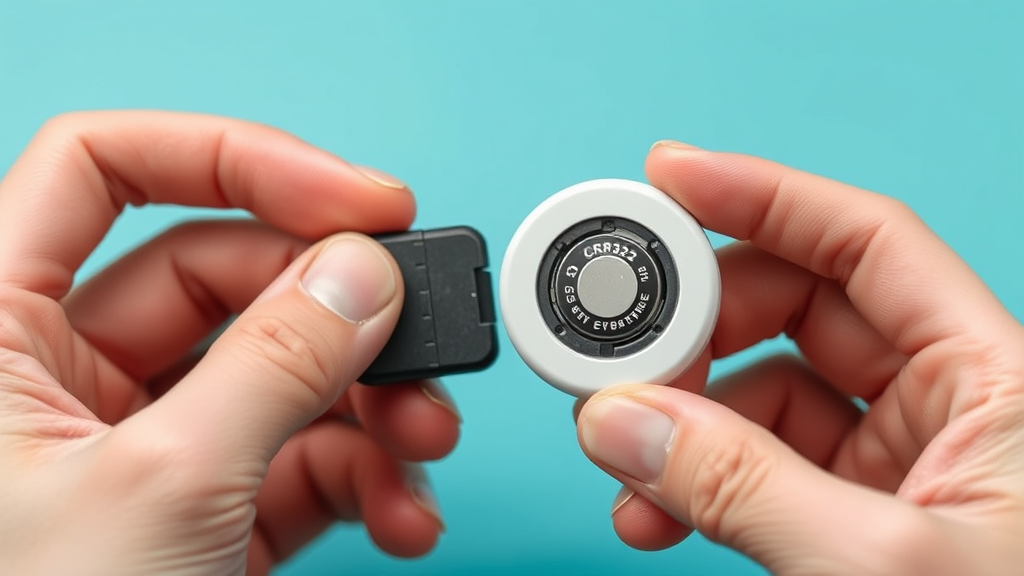
Start by holding the AirTag with the Apple logo facing up and the stainless steel back facing down toward your palm. Place your thumbs on the stainless steel back and apply gentle downward pressure while rotating counterclockwise. You’ll feel the back cover click and begin to turn – continue rotating until it stops, typically about a quarter turn.
Once loosened, the stainless steel back will lift away easily, revealing the internal components and battery. Carefully remove the old CR2032 battery, noting its orientation with the positive side facing up. Before installing the new battery, take a moment to inspect the contact points for any corrosion or debris that might affect connectivity.
Insert the new CR2032 battery with the positive side facing up, ensuring it sits flat against the contact points. Replace the stainless steel back by aligning it properly and rotating clockwise until you hear and feel it click into place. The AirTag should immediately activate, and you’ll hear a brief sound indicating successful battery installation.

Choosing the Right Replacement Battery
Not all CR2032 batteries are created equal, and selecting the right replacement can significantly impact your AirTag’s performance and longevity. Quality matters when choosing replacement batteries, as inferior products may provide shorter life spans, inconsistent voltage output, or even leak harmful chemicals.
Reputable battery manufacturers like Energizer, Duracell, and Panasonic produce high-quality CR2032 batteries that meet Apple’s specifications. These brands undergo rigorous testing to ensure consistent performance and safety standards. Avoid extremely cheap or unbranded batteries, as they may not provide the expected one-year lifespan and could potentially damage your AirTag.
When purchasing replacement batteries, check the expiration date to ensure maximum freshness. CR2032 batteries can maintain their charge for several years when stored properly, but fresher batteries will provide optimal performance. Consider buying batteries in small quantities rather than bulk purchases unless you have multiple AirTags or other devices that use the same battery type.
Some users prefer lithium batteries over standard alkaline options for their superior performance in extreme temperatures and longer shelf life. However, ensure any alternative battery type maintains the same voltage and physical specifications as the standard CR2032 to avoid compatibility issues.
Troubleshooting Common Issues
Occasionally, users may encounter issues during or after battery replacement that prevent their AirTag from functioning properly. Understanding common problems and their solutions can save time and frustration while ensuring your device returns to optimal performance quickly.
If your AirTag doesn’t activate after battery replacement, first verify that the new battery is properly seated with the correct orientation. The positive side should face up, and the battery should sit flush against the contact points. Remove and reinstall the battery if necessary, ensuring clean contact between all surfaces.
Sometimes, the AirTag may not immediately reconnect to your iPhone after battery replacement. This is normal behavior, as the device needs a moment to re-establish its Bluetooth connection and sync with the Find My network. Wait a few minutes and check the Find My app to confirm the AirTag appears and shows its current location.
In rare cases, the stainless steel back cover may not rotate smoothly during removal or installation. This could indicate debris or damage to the threading mechanism. Gently clean around the edges with a soft, dry cloth, and ensure you’re rotating in the correct direction – counterclockwise to remove, clockwise to install.
If problems persist after troubleshooting, the issue may be unrelated to the battery. Consider whether recent iPhone updates or changes to your device settings might be affecting AirTag functionality, similar to how users sometimes need to learn how to unhide apps on iphone after system updates.
Maintenance Tips for Optimal Performance
Proper maintenance extends your AirTag’s battery life and ensures consistent performance throughout its operational lifespan. Regular cleaning and mindful usage habits can significantly impact how long your battery lasts and how well your AirTag functions in various conditions.
Keep your AirTag clean and dry to prevent corrosion of the battery contacts and internal components. While AirTags are designed to be water-resistant, prolonged exposure to moisture can affect battery performance. If your AirTag gets wet, dry it thoroughly before storing or using it in enclosed spaces.
Monitor your AirTag’s usage patterns and adjust accordingly to maximize battery life. Frequently accessing your AirTag through the Find My app or using the precision finding feature consumes more battery power. Reserve these features for when you actually need to locate your items rather than using them recreationally.
Store spare CR2032 batteries in a cool, dry place to maintain their effectiveness. Extreme temperatures can reduce battery capacity and shorten lifespan. When not planning to use an AirTag for extended periods, consider removing the battery to prevent potential leakage or corrosion issues.
Regular software updates for your iPhone and the Find My app can improve AirTag efficiency and battery optimization. Apple periodically releases updates that enhance device performance and power management, so keeping your devices updated ensures optimal compatibility and functionality.
Understanding your device’s complete ecosystem helps with troubleshooting various issues. Just as users learn how to delete stickers on iphone or how to schedule a text on iphone for better device management, knowing how to maintain your AirTag ensures seamless integration with your Apple devices.
Frequently Asked Questions
How often should I replace my AirTag battery?
Under normal usage conditions, an AirTag battery should last approximately one year. However, this can vary based on usage frequency, environmental conditions, and how often you interact with the device through the Find My app. Heavy users may need to replace the battery every 8-10 months, while light users might get 12-15 months of use.
Can I use rechargeable CR2032 batteries in my AirTag?
While rechargeable CR2032 batteries exist, they typically provide lower voltage (3.6V vs 3.0V) and may not be compatible with AirTag specifications. Apple recommends using standard lithium CR2032 batteries for optimal performance and safety. Using non-standard batteries could potentially damage your device or void warranty coverage.
What should I do if the battery cover won’t come off?
If the stainless steel back cover seems stuck, ensure you’re applying even pressure with both thumbs while rotating counterclockwise. Sometimes, accumulated dirt or debris can make removal difficult. Try cleaning around the edges with a soft cloth, and make sure your hands are dry for better grip. Never use tools or excessive force, as this could damage the threading mechanism.
Will I lose my AirTag’s location history when I replace the battery?
No, replacing the battery will not affect your AirTag’s location history or settings. All information is stored on Apple’s servers and linked to your Apple ID through the Find My app. After battery replacement, your AirTag will reconnect automatically and continue functioning with all previous settings intact.
Can cold weather affect my AirTag’s battery life?
Yes, extreme cold temperatures can temporarily reduce battery performance and overall lifespan. Apple’s official specifications indicate that AirTags operate best in temperatures between 32°F to 95°F (0°C to 35°C). In very cold conditions, you may notice reduced range or responsiveness, but normal function typically returns when the device warms up.
Is it normal for my AirTag to make sounds during battery replacement?
Yes, it’s completely normal for your AirTag to emit sounds when you remove or install the battery. The device may chime when the battery is disconnected and again when reconnected with a fresh battery. These sounds indicate that the AirTag is functioning properly and has successfully recognized the new power source.
How can I dispose of old AirTag batteries safely?
CR2032 batteries contain lithium and should be disposed of properly through electronic waste recycling programs. Many electronics stores, including Apple retail locations, accept used batteries for recycling. Never throw lithium batteries in regular household trash, as they can pose environmental hazards. Check with your local EPA recycling guidelines for approved disposal methods in your area.

Related Posts

How Long to Boil Lobster Tails: Cooking Guide

How Long to Fly from New York to London? Travel Times
