

Boost Airtag Performance: Easy Battery Change Guide
Apple’s AirTag is a remarkable tracking device that helps you locate lost items with precision and ease. However, like all electronic devices, it relies on battery power to function effectively. When your AirTag’s battery begins to weaken, you’ll notice decreased performance, reduced range, and eventually complete functionality loss. Understanding how to change your AirTag battery is essential for maintaining optimal tracking performance and ensuring your valuable items remain protected.
The good news is that replacing an AirTag battery is a straightforward process that requires no special tools or technical expertise. With the right knowledge and a replacement CR2032 battery, you can restore your AirTag to full functionality in just a few minutes. This comprehensive guide will walk you through every step of the battery replacement process, helping you boost your AirTag’s performance and extend its operational life.
Understanding AirTag Battery Life
Apple AirTags are powered by a standard CR2032 coin cell battery, the same type commonly used in watches, key fobs, and other small electronic devices. According to Apple’s official documentation, a single CR2032 battery should provide approximately one year of typical usage. However, actual battery life can vary significantly based on several factors including usage frequency, environmental conditions, and the quality of the battery itself.
The CR2032 battery operates at 3 volts when new and gradually decreases in voltage as it depletes. AirTags are designed to function efficiently even as battery voltage drops, but performance begins to degrade when the voltage falls below optimal levels. Temperature extremes can also affect battery performance, with cold conditions reducing battery capacity and hot conditions potentially shortening overall lifespan.
Understanding your AirTag’s power consumption patterns helps you anticipate when battery replacement will be necessary. Frequent location updates, extended Bluetooth connectivity, and regular precision finding sessions all contribute to faster battery drain. Users who track items that move frequently or are located in areas with poor network coverage may experience shorter battery life due to increased power consumption during location attempts.
Signs Your AirTag Needs a Battery Replacement
Recognizing the warning signs of a dying AirTag battery is crucial for maintaining uninterrupted tracking capabilities. The most obvious indicator is a low battery notification that appears in the Find My app on your iPhone, iPad, or Mac. This notification typically appears when the battery voltage drops to approximately 10-15% capacity, giving you several days to weeks of remaining usage depending on your tracking patterns.
Beyond official notifications, several behavioral changes in your AirTag indicate battery depletion. You may notice delayed location updates, where your AirTag’s position in the Find My app becomes less accurate or updates less frequently. The Precision Finding feature, which provides detailed directional guidance when you’re near your AirTag, may become unreliable or completely unavailable as battery power diminishes.
Audio performance also degrades with battery depletion. The distinctive chiming sound your AirTag produces when activated through the Find My app may become quieter, shorter in duration, or fail to activate altogether. Additionally, the range at which your AirTag can communicate with nearby Apple devices decreases as battery voltage drops, potentially causing tracking gaps in areas with sparse Apple device coverage.
Some users report intermittent connectivity issues before complete battery failure, where the AirTag alternates between being detectable and undetectable by the Find My network. If you experience any of these symptoms, it’s time to learn how to replace airtag battery to restore full functionality.
Tools and Materials Needed
One of the most appealing aspects of AirTag battery replacement is the minimal equipment required. Unlike many electronic devices that require specialized tools, changing an AirTag battery can be accomplished with items you likely already have at home. The primary requirement is a replacement CR2032 lithium coin cell battery, which is widely available at electronics stores, pharmacies, grocery stores, and online retailers.
When purchasing a replacement battery, quality matters significantly. Premium brands like Panasonic, Duracell, and Energizer typically provide longer life and more consistent performance compared to generic alternatives. Avoid batteries that have been stored for extended periods or those with approaching expiration dates, as they may not deliver the full one-year lifespan expected from a fresh battery.
While no tools are strictly necessary for the replacement process, having a clean, well-lit workspace enhances success. A soft cloth or towel provides a clean surface and prevents the AirTag from rolling during the procedure. Some users prefer to work over a small bowl or container to catch the battery if it’s dropped during removal. Good lighting is essential for seeing the small alignment marks on the AirTag that indicate proper positioning during reassembly.
Optionally, a small piece of tape can help with battery removal if your fingers have difficulty gripping the smooth surface of the CR2032. However, most people can complete the replacement using only their hands with proper technique.
Step-by-Step Battery Replacement Process
The AirTag battery replacement process is elegantly simple, reflecting Apple’s commitment to user-friendly design. Begin by ensuring your hands are clean and dry to prevent contamination of the internal components. Place your AirTag on a clean, flat surface with the white Apple logo facing up and the stainless steel back facing down.
To open the AirTag, place your thumbs on the stainless steel back cover and apply gentle downward pressure while simultaneously rotating counterclockwise. The back cover will turn approximately 30 degrees before stopping – don’t force it beyond this point. You should feel a slight click as the cover releases from the internal locking mechanism. Lift the back cover straight up to reveal the internal battery compartment.
Remove the depleted CR2032 battery by gently lifting it from the compartment. Note the orientation – the positive (+) side should be facing up toward the removable cover. Take care not to touch the internal contacts or circuit board with your fingers, as oils from your skin can interfere with proper electrical connection.
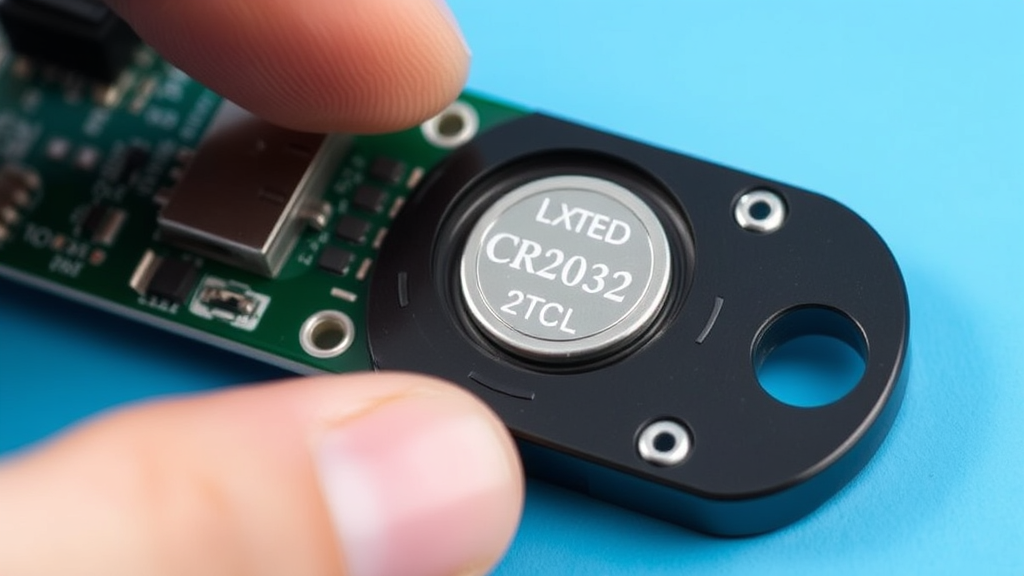
Insert the new CR2032 battery with the positive (+) side facing up, ensuring it sits flush in the battery compartment. The battery should drop into place easily without forcing. If resistance is encountered, double-check that you’re inserting it with the correct orientation and that no debris is preventing proper seating.
Replace the back cover by aligning it with the AirTag body and pressing down gently while rotating clockwise until you hear a click. The cover should turn approximately 30 degrees and lock into place. A successful reassembly will result in a completely flush fit with no gaps between the cover and the main body.
After reassembly, your AirTag should immediately power on and emit a brief startup sound. Check the Find My app to confirm the device is functioning properly and that the battery indicator shows full charge. The entire process typically takes less than two minutes with practice.
Troubleshooting Common Issues
Despite the straightforward nature of AirTag battery replacement, users occasionally encounter issues that require troubleshooting. The most common problem is difficulty removing the back cover, often caused by applying insufficient pressure or rotating in the wrong direction. Remember that significant force is required – more than you might initially expect – and the rotation must be counterclockwise when viewed from the back.
If the AirTag doesn’t power on after battery replacement, first verify that the new battery is properly seated and oriented correctly. The CR2032 should sit completely flat in the compartment with no tilting or partial insertion. Additionally, confirm that you’re using a fresh, high-quality battery, as some cheaper alternatives may not provide sufficient voltage even when new.
Intermittent connectivity issues after battery replacement often stem from contamination of the internal contacts. If your AirTag works sporadically, remove the battery again and gently clean the contact points with a dry, lint-free cloth. Avoid using liquids or cleaning solutions, which can damage the electronic components.
Some users report that their AirTag doesn’t appear in the Find My app immediately after battery replacement. This is typically resolved by giving the device several minutes to reconnect to the Find My network. If the problem persists, try moving closer to your iPhone or other Apple device to facilitate the initial connection. In rare cases, you may need to reset your AirTag by removing and reinserting the battery multiple times in quick succession.
If you’re experiencing broader issues with your Apple devices, you might also want to learn how to turn off find my iphone for troubleshooting purposes, though this should only be done temporarily during diagnostic procedures.
Maintenance Tips for Optimal Performance
Proper maintenance extends both battery life and overall AirTag performance, maximizing the value of your tracking investment. Environmental protection is paramount – while AirTags are rated IP67 for water and dust resistance, prolonged exposure to extreme conditions can accelerate battery drain and potentially damage internal components. Store tracked items in moderate temperature environments when possible, avoiding prolonged exposure to direct sunlight, freezing conditions, or high humidity.
Regular cleaning of the AirTag exterior prevents accumulation of dirt and debris that could interfere with the back cover’s sealing mechanism. Use a slightly damp cloth to wipe the surfaces, but avoid getting moisture into the seam between the cover and main body. The stainless steel back can be polished with appropriate metal cleaners if desired, but ensure no cleaning solution enters the device.
Monitor your AirTag’s performance through the Find My app, paying attention to location update frequency and accuracy. Sudden changes in these metrics may indicate developing issues before complete battery failure occurs. Consider setting calendar reminders to check battery status every few months, especially for AirTags attached to frequently used items.
Strategic placement of AirTags can also impact battery life. Items that move frequently or are stored in locations with poor cellular and Wi-Fi coverage will consume more power as the device works harder to maintain connectivity with the Find My network. According to Apple’s AirTag specifications, optimal performance occurs when the device can regularly connect with nearby Apple devices in the Find My network.
Keep spare CR2032 batteries on hand, especially if you use multiple AirTags. Batteries have a shelf life of several years when stored properly, making it practical to maintain a small supply. Store replacement batteries in a cool, dry location away from metal objects that could cause accidental discharge.
Frequently Asked Questions
How often should I replace my AirTag battery?
Apple estimates that AirTag batteries should last approximately one year under typical usage conditions. However, actual battery life varies based on usage patterns, environmental conditions, and battery quality. Heavy users who frequently trigger location updates or use Precision Finding may need to replace batteries every 8-10 months, while light users might achieve 12-15 months of operation. Monitor the battery status in the Find My app and replace when you receive low battery notifications.
Can I use rechargeable CR2032 batteries in my AirTag?
While rechargeable CR2032 batteries will physically fit in an AirTag, they’re not recommended for optimal performance. Rechargeable lithium coin cells typically operate at 3.6-3.7 volts compared to 3.0 volts for standard batteries, potentially causing compatibility issues. Additionally, rechargeable versions often have lower capacity and shorter lifespan in low-drain applications like AirTags. Standard lithium CR2032 batteries provide the best combination of longevity, reliability, and cost-effectiveness.
What should I do if my AirTag won’t turn on after battery replacement?
If your AirTag doesn’t activate after battery replacement, first verify that the new CR2032 battery is inserted with the positive (+) side facing up toward the removable cover. Ensure the battery sits completely flat in the compartment without tilting. Try removing and reinserting the battery several times, as this can help establish proper contact. If problems persist, test with a different new battery, as some batteries may be defective even when fresh from the package.
Is it safe to replace the AirTag battery myself?
Yes, replacing an AirTag battery is completely safe and designed to be performed by users. Apple specifically engineered the AirTag with a user-replaceable battery system that requires no special tools or technical expertise. The process doesn’t void your warranty and poses no safety risks when performed correctly. Follow the counterclockwise rotation method to open the device and ensure proper battery orientation during installation.
How can I extend my AirTag’s battery life?
Several strategies can help maximize AirTag battery life. Avoid unnecessarily frequent use of the Precision Finding feature, as it consumes significant power. Store tracked items in moderate temperature environments, as extreme heat or cold accelerates battery drain. Use high-quality CR2032 batteries from reputable manufacturers, and ensure your AirTag has regular access to the Find My network through nearby Apple devices. Consider the placement of your AirTags, as items that move frequently or are stored in areas with poor network coverage will consume more power.
Will replacing the battery affect my AirTag’s settings or pairing?
No, replacing the battery does not affect your AirTag’s pairing with your Apple ID or any configured settings. All personalization, including custom names, associated contacts, and Find My network participation, remain intact after battery replacement. The AirTag will automatically reconnect to your devices and resume normal operation once the new battery is installed. You don’t need to re-pair or reconfigure the device in any way.
Where can I buy replacement CR2032 batteries for my AirTag?
CR2032 batteries are widely available at electronics stores, pharmacies, grocery stores, and online retailers. Popular brands include Panasonic, Duracell, Energizer, and Sony. When purchasing, choose fresh batteries with recent manufacture dates and avoid bulk packages that may have been stored for extended periods. Many retailers sell multi-packs, which can be cost-effective if you have multiple AirTags or want to keep spares on hand. Online purchasing often provides the best prices, but ensure you’re buying from reputable sellers to avoid counterfeit batteries.

Related Posts

How Long to Boil Lobster Tails: Cooking Guide

How Long to Fly from New York to London? Travel Times
