
Block No Caller ID? Expert Tips Inside!
How to Block No Caller ID: Expert Tips and Step-by-Step Guide
Receiving calls from unknown numbers displaying “No Caller ID” can be frustrating and concerning. Whether you’re dealing with telemarketing calls, spam, or potential scammers, blocking these anonymous callers is essential for protecting your privacy and peace of mind. This comprehensive guide walks you through multiple methods to block No Caller ID calls on both smartphones and home phones, ensuring you regain control of your incoming communications.
Unknown callers who hide their identity behind “No Caller ID” or “Blocked” labels represent a growing problem for millions of people. These calls often originate from telemarketers, robocallers, or individuals with malicious intent. The good news is that modern phone systems offer several effective strategies to filter out these unwanted communications. By implementing the right combination of techniques, you can significantly reduce or eliminate anonymous calls from disrupting your daily life.
Understanding No Caller ID Calls
Before implementing blocking strategies, it’s important to understand what “No Caller ID” actually means. When a caller deliberately blocks their number from being displayed, it typically indicates either a spoofed number, a scammer, or someone intentionally hiding their identity. Legitimate callers—including healthcare providers, banks, and government agencies—usually display their phone numbers. When you see “No Caller ID,” “Unknown,” “Blocked,” or “Private Number,” you’re likely facing an unwanted caller.
The technology behind blocking caller ID involves the caller’s phone system deliberately withholding the Automatic Number Identification (ANI) signal that normally transmits their phone number to your device. Some callers use legitimate reasons for this, such as protecting witness confidentiality in legal cases, but the vast majority of No Caller ID calls are from bad actors attempting to avoid accountability. Understanding this distinction helps you decide which blocking method works best for your situation.
iPhone Methods to Block No Caller ID
iPhone users have several built-in features and settings to combat No Caller ID calls. Apple’s ecosystem provides both basic and advanced filtering options that require no additional apps or subscriptions.
Using Silence Unknown Callers
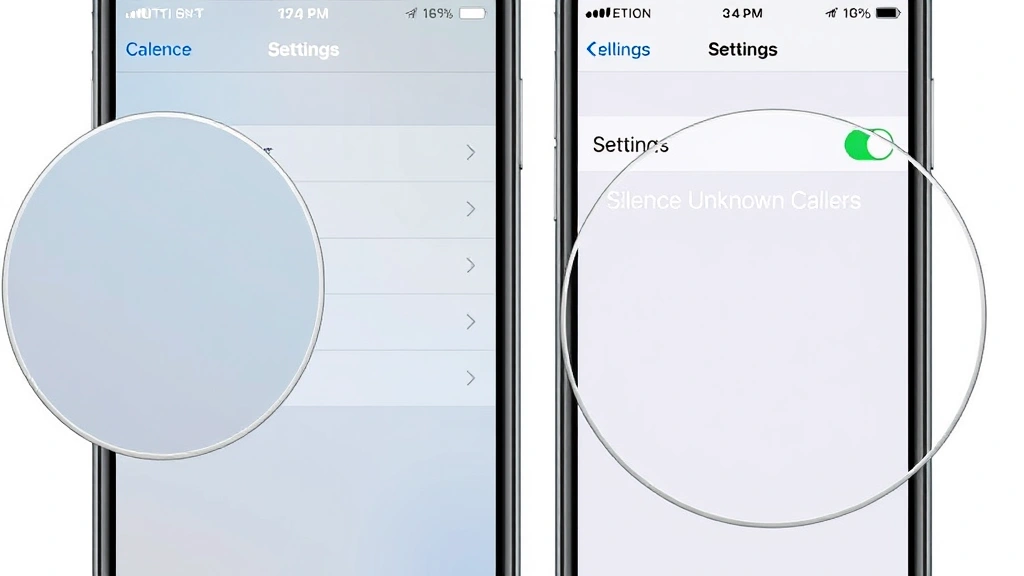
The most straightforward method on iPhone is the “Silence Unknown Callers” feature, available on iPhone XS, XR, and newer models. This feature automatically silences calls from numbers not in your contacts, recent calls, or Siri suggestions. To enable this feature:
- Open the Settings app on your iPhone
- Navigate to Phone settings
- Scroll down and tap “Silence Unknown Callers”
- Toggle the switch to enable it
When activated, unknown callers go directly to voicemail, and you’ll see a notification in your notification center. This is particularly effective because legitimate callers can still reach you through voicemail, while spammers rarely leave messages.
Creating Custom Filtering Rules
You can also create custom filtering rules by using the Do Not Disturb feature combined with your contacts. Create a custom “Do Not Disturb” schedule that allows calls only from your Favorites or designated contacts. Visit your FixWiseHub Blog for additional tech troubleshooting guides for more advanced iPhone customization techniques.
Reporting and Blocking Individual Numbers
When you receive a call from a No Caller ID number that you want to block:
- Open the Phone app and find the recent call
- Tap the information icon (i) next to the call
- Select “Block this Caller”
- Confirm your selection
While this won’t block all No Caller ID calls, it does block that specific spoofed number from contacting you again.
Android Phone Solutions
Android devices offer comparable features to iPhones, though the exact steps vary depending on your manufacturer and Android version. Most modern Android phones include built-in call filtering capabilities that work effectively against No Caller ID callers.
Google Phone App Call Screening
If you use Google’s Phone app (available on most Android devices), you can enable call screening and filtering. This feature uses machine learning to identify spam and scam calls:
- Open the Google Phone app
- Tap the Menu icon (three horizontal lines)
- Select Settings
- Choose “Spam and call screen”
- Toggle on “Filter unknown calls”
When this feature is active, unknown callers are prompted to state their name and purpose before your phone rings. This screen typically stops most robocallers and scammers immediately.
Samsung Devices
Samsung phones include a built-in Call Filter app. To configure it:
- Open the Phone app
- Tap the Menu button
- Select “Settings” then “Call rejection”
- Enable “Unknown” in the rejection list
Other Android Manufacturers
Most Android manufacturers (OnePlus, Motorola, Google Pixel) include similar call filtering features in their default Phone apps. Check your phone’s settings under Phone or Call settings to locate the spam filtering options.
Home Phone and Landline Options
If you have a traditional landline or home phone, blocking No Caller ID calls requires different approaches since these devices don’t have the same software capabilities as smartphones.
Carrier-Provided Call Blocking
Contact your phone service provider to inquire about their call blocking services. Most major carriers offer services such as:
- AT&T Call Protect: Blocks known spam and allows you to block anonymous calls
- Verizon Call Filter: Identifies and blocks suspected spam calls
- T-Mobile Scam Shield: Automatically blocks suspected scam calls
These services are often available at no additional cost, though premium versions with enhanced features may require a subscription.
Using a Device-Level Call Blocker
Hardware call blockers plug directly into your landline and filter calls before they reach your phone. These devices maintain databases of known spam numbers and can block calls based on various criteria, including calls with no caller ID information. Popular options include the Nomorobo device and similar hardware solutions.
Creating a Whitelist
Some advanced landline devices allow you to create a whitelist of approved numbers. When this feature is enabled, only calls from numbers on your approved list will ring through, with all other calls going to voicemail. This is the most restrictive option but highly effective if you receive frequent No Caller ID calls.
Carrier-Level Blocking Services
Your phone carrier offers the most comprehensive blocking solutions since they can filter calls at the network level before they ever reach your device. These services are highly effective and worth exploring.
AT&T Call Protect
AT&T’s Call Protect service includes automatic spam detection and blocking. The premium version allows you to block calls from anyone not in your contacts. Visit AT&T’s official support page for complete details on enabling this service.
Verizon Call Filter
Verizon’s service automatically identifies and blocks suspected spam calls. Premium features include the ability to block anonymous calls and create custom block lists. The free version provides basic spam detection, while the paid version offers enhanced filtering options.
T-Mobile Scam Shield
T-Mobile’s Scam Shield automatically identifies and blocks calls from known scammers. Premium features include caller ID lookup and custom block lists.
Sprint and Other Carriers
Contact your specific carrier to ask about their spam and call blocking services. Most carriers now offer some form of No Caller ID blocking as part of their service portfolio.
Third-Party Apps and Tools
Beyond built-in solutions, numerous third-party applications provide advanced call filtering and blocking capabilities. These apps often use crowdsourced data and machine learning to identify and block unwanted calls.
Popular Call Blocking Apps
TrueCaller: One of the most popular call blocking apps, TrueCaller maintains a massive database of spam numbers and No Caller ID patterns. The app identifies incoming calls and automatically blocks suspected spam.
RoboKiller: This app uses audio fingerprinting technology to identify and block robocalls. It can answer calls and make scammers think they’ve reached a real person, wasting their time instead of yours.
Whoscall: Available on both iOS and Android, Whoscall identifies unknown callers and blocks spam calls automatically. The app includes a reverse phone lookup feature to identify legitimate unknown callers.
How Third-Party Apps Work
Most third-party call blocking apps function by creating a community-driven database of spam and scam numbers. When someone reports a number as spam, that information is added to the database and shared across all users. When an incoming call matches a flagged number or exhibits spam characteristics, the app automatically blocks or screens the call. For more information on tech solutions and how to troubleshoot communication issues, check out our guide on becoming a software engineer to understand the technology behind these systems.
Legal Considerations and Best Practices
While blocking No Caller ID calls is entirely legal and within your rights, understanding the regulations surrounding caller ID blocking helps you take a comprehensive approach to phone security.
The Telephone Consumer Protection Act (TCPA)
The TCPA makes it illegal for telemarketers to block their caller ID information when making sales calls. If you receive a call claiming to be from a legitimate business with No Caller ID, you may be dealing with a scammer impersonating that business. Reporting these calls to the FCC helps combat these illegal practices.
Legitimate Reasons for No Caller ID
Some calls legitimately hide their number, including:
- Law enforcement and emergency services
- Witness protection programs
- Domestic violence shelters and support services
- Confidential medical facilities
- Government agencies with security protocols
If you suspect you’re blocking legitimate calls, consider using a whitelist approach instead of blanket blocking all No Caller ID calls.
Best Practices for Phone Security
Never provide personal information to unknown callers: Legitimate organizations will never ask for sensitive information like Social Security numbers, bank account details, or passwords over the phone.
Verify caller identity independently: If someone claims to be from your bank or a government agency, hang up and call the official number listed on your statement or the agency’s website.
Register with the Do Not Call Registry: The National Do Not Call Registry provides some protection against telemarketing calls, though it doesn’t stop all unwanted callers.
Report suspicious calls: Report spam and scam calls to the FCC at 888-CALL-FCC or through their online complaint form. These reports help authorities track and prosecute scammers.
Use multiple layers of protection: Combining carrier-level blocking, device settings, and third-party apps provides the most comprehensive protection against No Caller ID calls.
FAQ
Can I block all No Caller ID calls on my iPhone?
Yes, using the “Silence Unknown Callers” feature on iPhone XS and newer models will silence all calls from numbers not in your contacts. However, this is a silencing feature rather than true blocking—callers go to voicemail instead of receiving a busy signal.
Will blocking No Caller ID calls prevent legitimate callers from reaching me?
Potentially, yes. Some legitimate callers, such as certain healthcare providers or government offices, may block their caller ID. If you’re concerned about missing important calls, use a whitelist approach instead, allowing only calls from your contacts through.
Are third-party call blocking apps safe to use?
Most reputable call blocking apps are safe, but research any app before downloading. Check reviews, verify the developer’s reputation, and review what permissions the app requests. Avoid apps that ask for unnecessary access to your personal data.
Do carrier call blocking services cost extra?
Many carriers offer basic call blocking features at no additional cost. Premium versions with enhanced features may require a monthly subscription, typically ranging from $2.99 to $4.99 per month.
What should I do if I’m receiving threatening No Caller ID calls?
If you’re receiving threatening or harassing calls, report them to local law enforcement and the FCC. Document the dates, times, and any details about the calls. If the harassment continues, consider consulting with a lawyer about obtaining a restraining order or other legal remedies.
Can I trace a No Caller ID call?
Tracing a No Caller ID call is extremely difficult for regular users, though law enforcement can often do so with proper authorization. If you need to trace threatening calls, contact local police and provide them with all available information.
How often should I update my call blocking settings?
Review your call blocking settings monthly and update your app subscriptions as needed. Scammers constantly develop new tactics, so staying current with the latest blocking technology ensures maximum protection.

Related Posts

Superscript in Google Docs: Expert Tips

Strikethrough in Excel: Easy Steps for Beginners
